Access your student record
If you were a student at AUArts and no longer have an active auarts.ca email address, you can still access the student portal to view your unofficial transcript, order official transcripts, and download your T2202 tax forms.
If you haven’t set up a log in already, the directions are below.
Replacement of a Parchment
If your original parchment has been damaged or misplaced, you may order a replacement copy. You may also order a new parchment if your legal name has changed. AUArts does not issue multiple copies of parchments.
- Download and complete the Parchment replacement form.
- Provide the documentation indicated on the form.
- Return your original parchment to Alberta University of the Arts.
- A processing fee will apply.
Student Webservice Login Setup
Former Students
Before you start, you will need:
- Your AUArts Student ID number
- Access to the personal email address we have on file for you
- A telephone number for two-factor authentication
If you’ve forgotten your AUArts ID, please call the Office of the Registrar at 403-284-7634, or email registrar@auarts.ca.
Option 1: Set up a login with your email and password
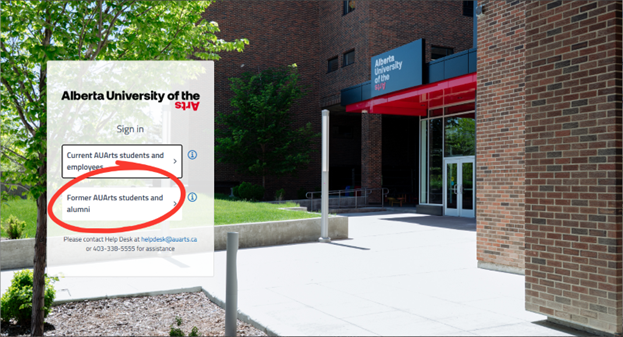
- From the login screen, click the “Former Students and Alumni” option.
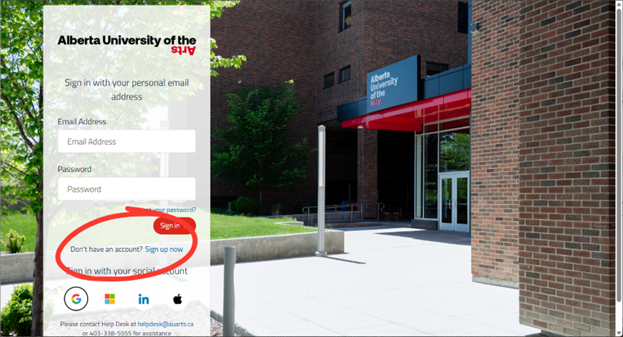
- To set up a login by email and password, choose "Sign up now".
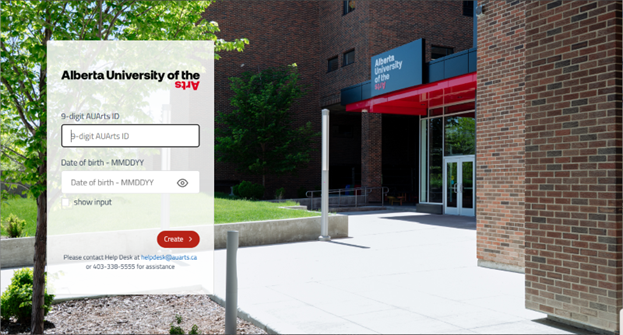
- You’ll then be asked for your AUArts Student ID and your date of birth (formatted as MMDDYY).
- The system will display the email we have on file for you; click to send a verification code to that email.
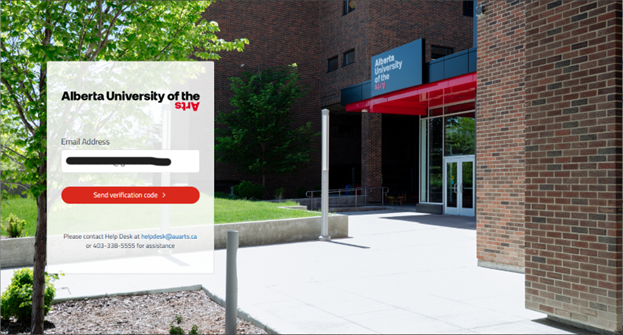
- Enter the code, and you will be prompted to set up a password.
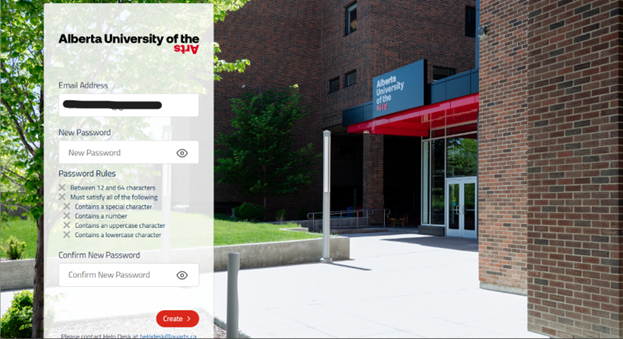
- You’ll then be asked for a phone number for two-factor authentication; you can choose to receive the authentication code by text or voice.
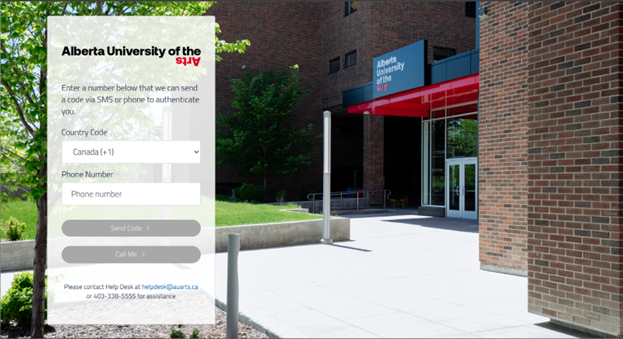
- Once your two-factor authentication is set up, you should be logged into student self-service, where you’ll be able to see your unofficial transcript, order official transcripts, and access your T2202 tax forms.
Option 2: Set up a login via Google account or Apple ID
- To login with your Google or Apple credentials, start by clicking on the corresponding logo.
- You’ll be asked to log into the selected account before proceeding.
- You’ll then be asked for your AUArts Student ID and your date of birth (formatted as MMDDYY, as pictured above).
- The system will display the email we have on file for you; click to send a verification code to that email.
- Enter the code and you’ll then be asked for a phone number for two-factor authentication; you can choose to receive the authentication code by text or voice.
Once your two-factor authentication is set up, you should be logged into student self-service, where you’ll be able to see your unofficial transcript, order official transcripts, and access your T2202 tax forms.
Troubleshooting tips
I get a message that says “Sorry, we don't have enough information to verify your identity. Please contact helpdesk@auarts.ca for assistance.”
- The student ID and/or date of birth you entered can’t be found.
- Make sure that your ID contains the full 9 digits (including 0’s at the start) and that your birthdate is formatted numerically as MMDDYY. (i.e. April 1, 2002 would be 040102).
- If you’ve forgotten your AUArts ID, please call the Office of the Registrar at 403-284-7634, or email registrar@auarts.ca.
I didn’t get a verification code sent to my email.
- Please check your spam folder; some systems incorrectly flag verification emails.
I no longer have access to the email address on file.
- To update your email address, please call the Office of the Registrar at 403-284-7634.
I need a rush transcript.
- If you’re a former undergraduate or graduate student, complete this PDF form to request a rush transcript.